← Voice Next Door
YouTube · @Silans Risk of Rain 2 · 1.4.1 · BepInEx

RoR Cheat Panel

Внутриигровая панель для Risk of Rain 2: предметы, godmode, noclip, телепорт, артефакты, этапы, боссы и админка игроков. Открывается по хоткею прямо в матче. In-game panel for Risk of Rain 2: items, godmode, noclip, teleport, artifacts, stages, bosses and a player admin tab. Opens with a hotkey right in the match.

СкачатьDownload v1.1 · zip · 2.5 MB

BepInEx уже внутри — ничего больше ставить не нужно. BepInEx is bundled — nothing else to install.
SHA-256: 2cd53bf6…1ff71d что это?what's this?

В игре:In game: Ctrl + F10 илиor Insert

Что внутриWhat's inside

Шесть разделов. Предметы, карты, тела и скиллы читаются из каталогов игры при запуске — после патчей всё появляется само. Six sections. Items, stages, bodies and skills are read from the game catalogs at startup, so new content shows up after patches automatically.

◆ЛутLoot

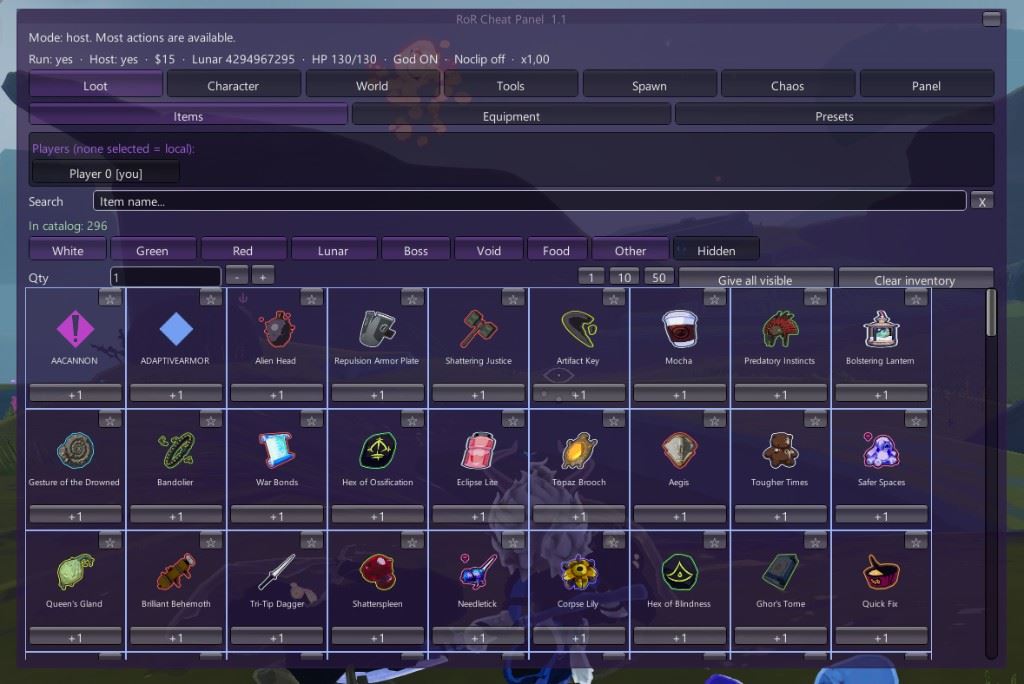
Любые предметы и снаряжение в любом количестве, дождь лута, сохраняемые пресеты сборок.Any items and equipment in any quantity, loot rain, saveable build presets.

☺ПерсонажCharacter

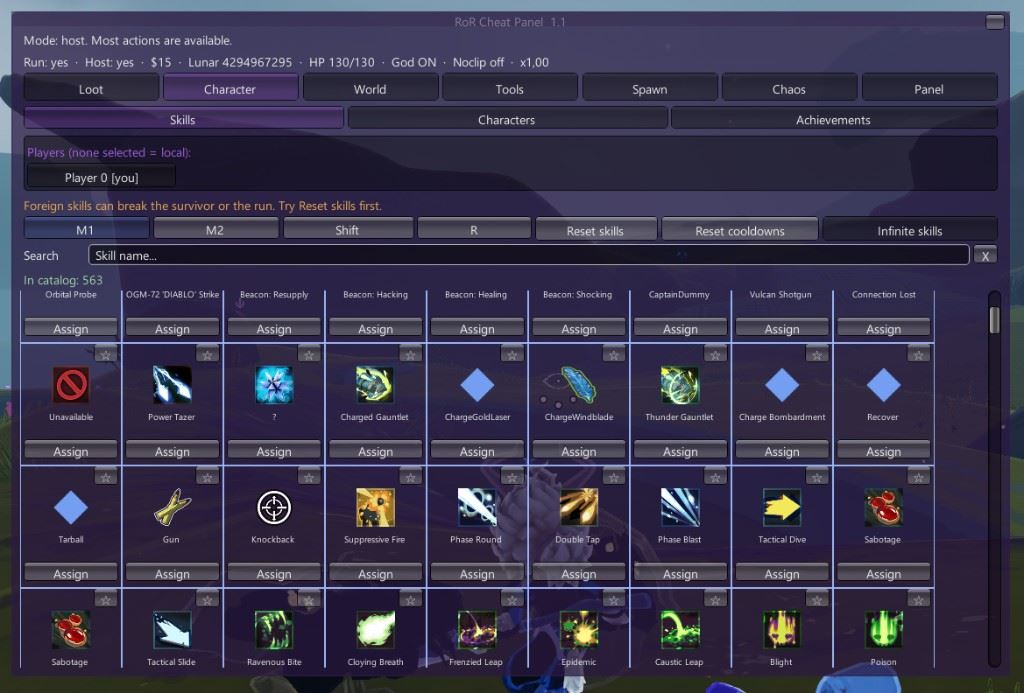
Смена скиллов, тела и NPC, разблокировка ачивок, статы с ползунками.Swap skills, bodies and NPCs, unlock achievements, stat sliders.

◎МирWorld

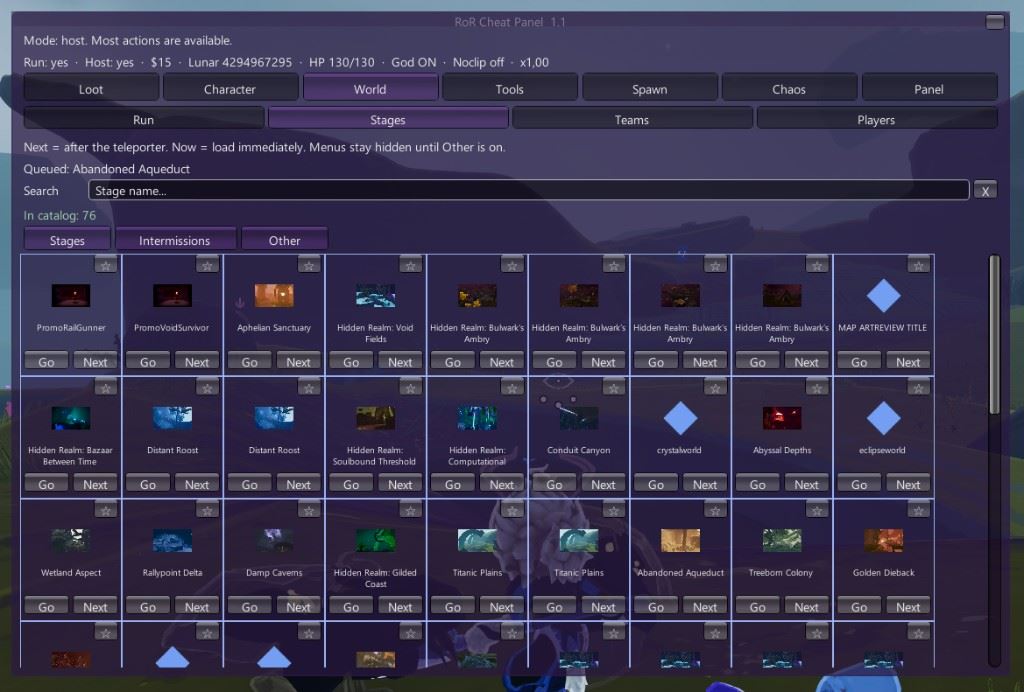
Артефакты и сложность на лету, переход на любой этап, команды, зарядка телепортера.Artifacts and difficulty on the fly, jump to any stage, teams, instant teleporter charge.

⚙ИнструментыTools

Godmode, noclip с полётом по камере, деньги, телепорт к курсору, призыв мобов и союзников.Godmode, camera-fly noclip, money, teleport to cursor, spawn monsters and allies.

✶ХаосChaos

Рандом-режимы, камера, смена ника, вызов босса, армия клонов и дронов одной кнопкой.Random modes, camera tricks, nickname change, summon a boss, a clone-and-drone army in one click.

♛Игроки (хост)Players (host)

Кик, бан, мут, noclip / god / заморозка / хил для любого игрока в лобби — мод у него не нужен.Kick, ban, mute, noclip / god / freeze / heal for anyone in the lobby — they don't need the mod.

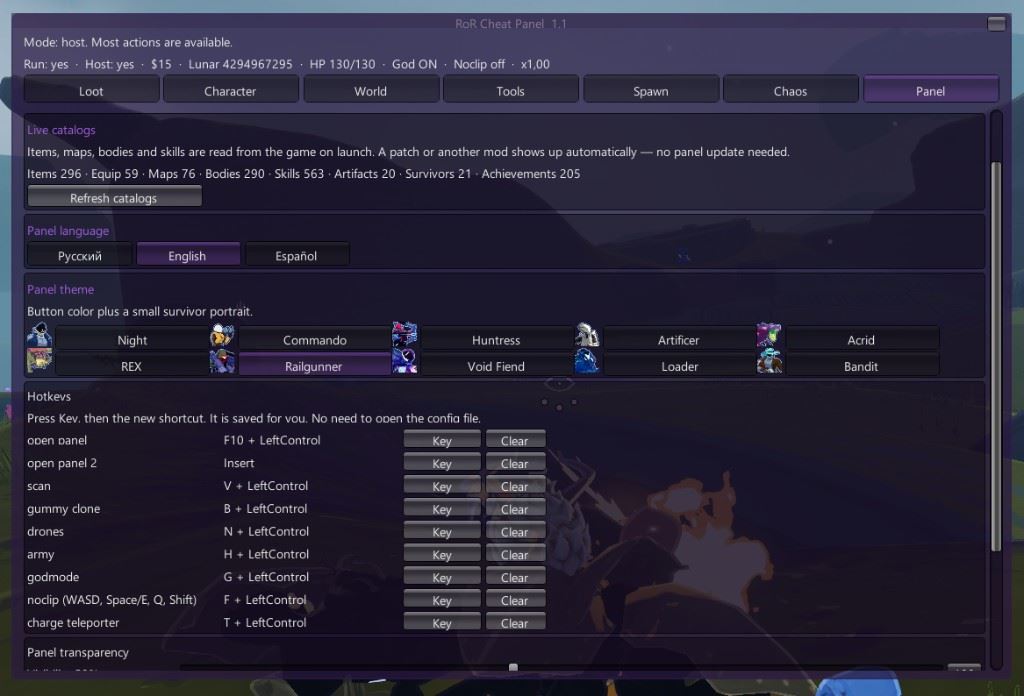
Важно:Note: почти всё, кроме ачивок, работает только у хоста. В коопе хостит тот, у кого стоит панель. Интерфейс на русском, английском и испанском, 10 цветовых тем. almost everything except achievements works for the host only. In co-op, the player with the panel should host. UI in Russian, English and Spanish, 10 color themes.

Как выглядитWhat it looks like

Панель открывается поверх матча. Предметы, скиллы, этапы и настройки. The panel opens over a match. Items, skills, stages, and settings.

RoR Cheat Panel item grid
Лут · предметыLoot · items
RoR Cheat Panel skill grid
Персонаж · скиллыCharacter · skills
RoR Cheat Panel stage picker
Мир · этапыWorld · stages
RoR Cheat Panel settings
Панель · язык, темы и клавишиPanel · language, themes, and hotkeys

УстановкаInstall

Две минуты, без лаунчеров.Two minutes, no launchers.

Открой папку с игройOpen the game folder

Там лежит Risk of Rain 2.exe. Обычно этоThe one with Risk of Rain 2.exe. Usually Steam\steamapps\common\Risk of Rain 2.
В Steam: ПКМ по игре → Управление → Посмотреть локальные файлы.In Steam: right-click the game → Manage → Browse local files.

Распакуй архив в эту папкуExtract the archive into that folder

Рядом с exe должны появиться:Next to the exe you should now have:

  • winhttp.dll
  • doorstop_config.ini
  • папкаthe BepInEx folder

Если спросит заменить файлы — заменяй.If asked to overwrite files, say yes.

Запусти игруLaunch the game

Первый запуск чуть дольше обычного. В матче нажмиFirst launch takes a bit longer. In a match press Ctrl+F10 илиor Insert.

Уже стоит BepInEx / r2modman?Already have BepInEx / r2modman? Тогда достаточно скопировать из архива папкуThen just copy the BepInEx\plugins\RoRCheatPanel в свойfolder from the archive into your BepInEx\plugins. Хоткеи меняются вHotkeys can be changed in BepInEx\config\com.rorcheatpanel.plugin.cfg.

ХоткеиHotkeys

Всё переназначается в конфиге после первого запуска.Everything is rebindable in the config after the first launch.

КлавишиKeysДействиеAction
Ctrl+F10 / InsertОткрыть / закрыть панельToggle panel
Ctrl+FNoclip
Ctrl+GGodmode
Ctrl+VСкан интерактивовScan interactables
Ctrl+BGummy Clone
Ctrl+NDrone Backup
Ctrl+MАрмия (клоны + дроны)Army (clones + drones)
Ctrl+TЗарядить телепортерCharge teleporter
NoclipДействиеAction
W A S DПолёт по камереFly along the camera
Space / EВверхUp
QВнизDown
Shift×3 скорость×3 speed
Скорость по умолчанию 22, слайдер во вкладке «Инструменты». Край карты в noclip не возвращает назад.Default speed 22, slider in the Tools tab. The map boundary doesn't pull you back while in noclip.

Поддержи проектSupport the project

Панель бесплатная и такой останется. Лучшая благодарность — подписка на канал: там ролики с панелью, анонсы обновлений и новые фичи раньше всех. The panel is free and will stay that way. The best thank-you is a subscription: videos with the panel, update announcements and new features before anyone else.

ПодписатьсяSubscribe

FAQ

Друг без мода видит мои читы?Does a friend without the mod see my cheats?

Да, если ты хост. Предметы, телепорт, боссы, noclip/god для других игроков — всё синхронизируется через сервер. Только ачивки «выбранным» требуют панель у них.Yes, if you host. Items, teleport, bosses, noclip/god for other players — all of it syncs through the server. Only "achievements for selected players" need the panel on their side.

Статы не меняютсяStats don't change

Во вкладке «Инструменты» сначала нажми «Прочитать текущие», потом двигай ползунки и «Apply changes».In the Tools tab press "Read current" first, then move the sliders and hit "Apply changes".

Где баны и пресеты?Where are bans and presets?

Баны — BepInEx\plugins\RoRCheatPanel\bans.txt, пресеты — папка Presets рядом. Удалил файл — снял бан.Bans — BepInEx\plugins\RoRCheatPanel\bans.txt, presets — the Presets folder next to it. Delete the file to lift a ban.

Как удалить?How to uninstall?

Удали winhttp.dll, doorstop_config.ini и папку BepInEx из папки игры. Или только BepInEx\plugins\RoRCheatPanel, если хочешь оставить BepInEx.Delete winhttp.dll, doorstop_config.ini and the BepInEx folder from the game directory. Or just BepInEx\plugins\RoRCheatPanel to keep BepInEx.

Что за SHA-256 под кнопкой скачивания?What's the SHA-256 under the download button?

Это «отпечаток» архива. Если кто-то перезальёт файл с добавленным вирусом, отпечаток изменится, даже если размер и название те же. Сверив его, ты точно знаешь, что качаешь оригинал. Проверить просто: скачай архив, открой PowerShell в папке с ним и выполни: It's the archive's fingerprint. If someone re-uploads the file with malware added, the fingerprint changes even if the size and name look the same. Compare it and you know you've got the original. To check: download the archive, open PowerShell in that folder and run:

Get-FileHash .\RoRCheatPanel-1.1.zip

В строке Hash должно быть: The Hash line should read:

2CD53BF6D437661F507F8EAE07556BE4FD019BFF99C85C6AED2C4CF99B1FF71D

Совпало — файл оригинальный. Не совпало — не запускай и скачай заново с этой страницы. На Linux/Mac та же проверка: sha256sum RoRCheatPanel-1.1.zip. Matches — the file is genuine. Doesn't match — don't run it, re-download from this page. On Linux/Mac: sha256sum RoRCheatPanel-1.1.zip.

ОтзывыReviews

—
пока нет отзывовno reviews yet
Загрузка…Loading…

Оставить отзывLeave a review

ОценкаRating

Нашёл баг? НапишиFound a bug? Tell me

Сообщение уходит напрямую автору. Чем точнее опишешь — тем быстрее починю. Goes straight to the author. The more precise the description, the faster the fix.

  • Что делал и что ожидал увидетьWhat you did and what you expected
  • Что произошло на самом делеWhat actually happened
  • Ты хост или гость, сколько игроковHost or client, how many players
  • Другие моды, если стоятOther mods, if any
  • Файл BepInEx\LogOutput.log — если есть, вставь ошибку из негоThe BepInEx\LogOutput.log file — paste the error from it if there is one
id="fb-form" autocomplete="off" novalidate>
ТипType